Over the past few years, the first wave of AI in business intelligence focused on asking questions of your data. While useful, this is only one aspect of the way business users actually work. Most users don’t start from a blank chat box; they start their analysis from a dashboard, a KPI, a filtered view, or simply a decision they need to make.
When Sigma unveiled the launch of ‘Sigma Agents’ during their Workflow Keynote in March, it was clear that the way people consumed analytics would evolve, as would the way developers build their products. The evolution from dashboards to apps that contain embedded AI truly enables the data product to become the place where decisions occur.
With Sigma Agents now in public beta as of 6/12/26, we wanted to showcase the value of an AI assistant embedded directly into the workflow.
We built an analytics agent that can answer user questions about sales and inventory data. The agent no longer just spits out some black-box analysis; it’s configured to update dashboard filters, modify existing elements, set control values, and guide the user through their analysis.
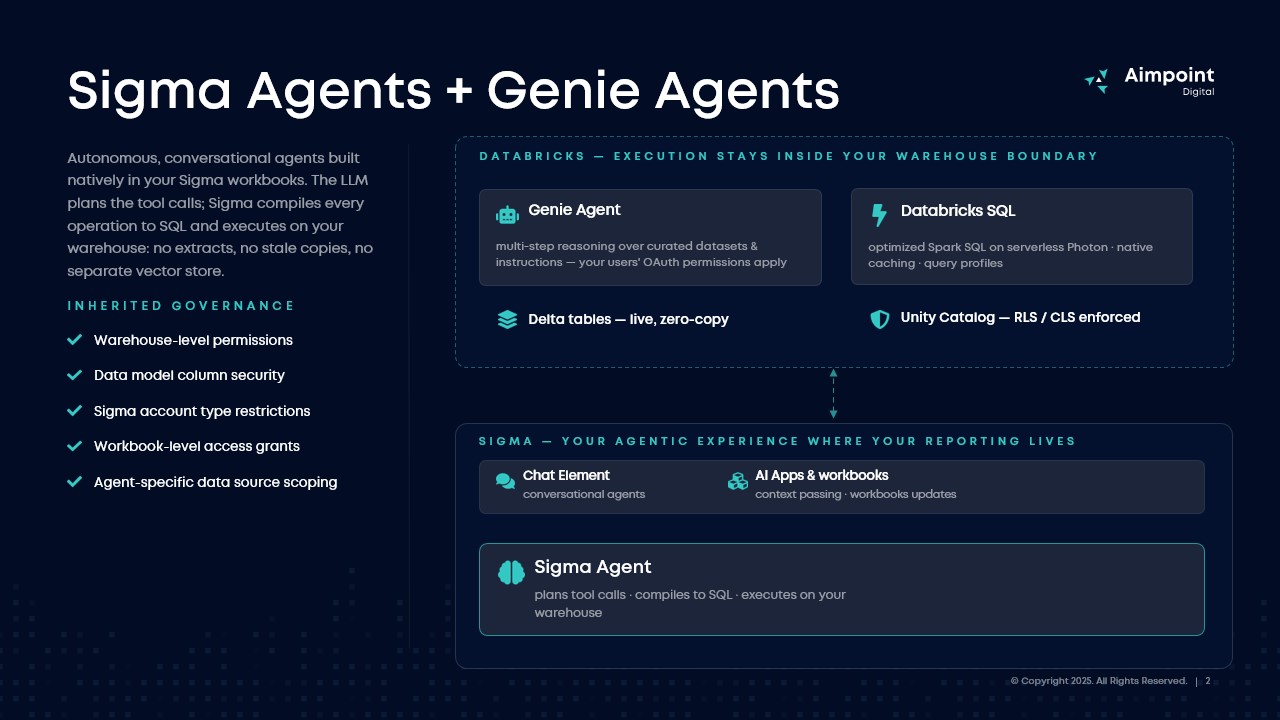
This agent acts as the orchestration engine between two Databricks Genie Agents, each powered by a Databricks Metric View for Sales and Inventory. This experience allows users to ask questions across both data sources in one familiar Sigma experience while preserving warehouse-defined metrics, governance, and security.
The result?
Databricks provides the governed semantic and AI reasoning layer. Sigma provides the business-facing interface where users explore, act, and make decisions.
That distinction is important, because the future of AI in analytics isn’t just about generating correct answers. It is about connecting those answers to the workflows where decisions happen, and Sigma is frequently the place where the business users already live.
The experiment: an agent inside the dashboard
For this test, I used a sales performance dashboard with common business analytics patterns: revenue trends, category performance, profitability, margin, transaction metrics, inventory fluctuation, and user-driven controls.
The differentiator here is that the agent operates the dashboard seamlessly for the user, rather than simply returning the answer to a question like, “What was total revenue last month?”
For example, a user might ask:
“Show me quarterly revenue trend by region for 2024.”
Instead of requiring the user to manually adjust the date filter, find the right grouping, and update the visualizations, the agent can trigger predefined Sigma actions to set the correct dashboard state.
A user might ask:
“Compare Dairy brand profitability month over month.”
The agent can apply the appropriate category context, change the time granularity, swap the metric in the control and charts, and adjust the dashboard to show the relevant comparisons.
A user might ask:
“What is driving the margin decline?”
At that point, the agent can use a Databricks Genie Agent as a tool to ask deeper questions against governed Databricks data assets. The user does not need to leave the Sigma dashboard to benefit from the semantic context and analytical reasoning available in Databricks.
While well-built dashboards allow consumers to self-service their questions, users now have an assistant to curate a seamless experience for them.
Cool, but why does this matter?
Dashboards are often designed around the assumption that users know where to click:
- They know which filter to change.
- They know which dimension to swap.
- They know which page contains the details they need.
- They know whether a question should be answered in the dashboard, in SQL, in a semantic layer, or by asking another analyst.
In reality, many business users do not think that way. They think in business terms such as:
- “Why did margin drop?”
- “Which products are driving the change?”
- “Show me the Southeast and compare year over year.”
Analytics tools have been able to take natural language questions, convert them to SQL, and return an answer for a few years. Now, agents have the ability to combine natural language, dashboard context, governed data, and predefined actions into one workflow.
Where Databricks Genie fits in this stack?
Databricks Genie is valuable when users want to ask natural language questions against governed Databricks data. When paired with curated data assets, strong instructions, and Metric Views, Genie can provide a powerful conversational interface for exploring data directly in the Databricks ecosystem.
That makes a lot of sense for teams who already live in Databricks, especially technical analysts, data teams, and business users who are comfortable using a conversational data experience to ask follow-up questions.
In this architecture, Genie Agents are especially useful because they can sit close to the governed data layer. If Metric Views define consistent business logic for revenue, margin, transaction count, or other KPIs, Genie can use those definitions as part of the natural language experience.
In other words, Genie is well positioned for governed data Q&A inside the Databricks environment.
But many business workflows do not start in Databricks. They start in a dashboard, an embedded application, a recurring business review, or an operational process; which is where Sigma comes in.
How Sigma Agents fit in
In the build I tested, the Sigma Agent had three important responsibilities.
- First, it understood the context of the workbook. The agent was not operating in isolation. It knew the dashboard it was embedded in and could respond in ways that made sense for that experience.
- Second, it could trigger deterministic actions. This is a key distinction. For critical dashboard interactions, I do not necessarily want the agent improvising, I want predefined actions that behave consistently every time. Setting a filter, changing a control, swapping a dimension, or navigating to another view should be reliable and intentional each time.
- Third, it could call warehouse-native AI tools when needed. The agent did not have to answer every question on its own with the dashboard. For deeper analytical questions, it could use the Databricks Genie Agents as tools, allowing the workflow to benefit from Databricks-governed data reasoning while keeping the user in Sigma.
That combination is powerful:
Sigma handles the UX workflow, while Databricks handles governed data intelligence. The agent connects the two in one place.
Design Principles
- Start with the workflow, not the agent
- The best agent use cases are not generic. They are tied to a specific business process or analytical flow.
- In this case, the workflow was sales performance exploration. The agent’s job was to help users move through revenue, profit, margin, category, and inventory questions. That made the experience easier to design because the agent had a clear purpose.
- A vague “analytics assistant” is harder to govern and harder to evaluate. A focused dashboard agent is easier to test, tune, and trust.
- Use actions for predictable interactions
- For important dashboard changes, predefined actions matter.
- If a user asks to filter to 2024 or switch a metric, the agent should not be guessing its way through the UI. It should call a reliable action that has already been configured and tested.
- This is one of Sigma’s biggest strengths in the pattern. The agent can use natural language as the interface, but the execution can still be deterministic.
- Let Databricks handle governed data reasoning
- If an organization has already invested in Databricks Metric Views, Unity Catalog, and Genie Agents, those assets should be part of the AI workflow.
- Rather than recreating all semantic logic in the BI layer or agents hosted there, teams can use Databricks as the governed data intelligence layer and expose that capability to Sigma Agents through warehouse agent tooling.
- This gives business users access to deeper analysis without requiring them to understand where the semantic layer begins and the dashboard layer ends.
- Plan first, build your agent second
- The quality of the agent experience depends heavily on the quality of the underlying structure of the assets.
- If the dashboard is confusing, the semantic layer is inconsistent, or the Genie Agent is poorly curated, the agent will inherit those problems downstream. AI does not remove the need for strong data modeling. It raises the importance of it.
- The best results come when the semantic layer, dashboard design, action configuration, and agent instructions are all designed together.
Why Sigma is the place to embed your AI consumption
Ideally, your AI isn’t just an LLM responding to a prompt. In analytics, proper utilization needs context, permissions, governed data, application state, user intent, and the ability to take action.
A theoretical tech stack of Databricks and Sigma for your BI:
- Databricks owns the governed data, semantic definitions, and warehouse-native AI
- Sigma can bring that intelligence into the dashboard and application layer where business users are already working, leveraging the same metric views and Genie Agents created upstream into workflows downstream
Sigma Agents are not just another natural language interface, they’re a part of the interesting opportunity for agentic BI: assistants that understand dashboard context, use governed warehouse-native agents when needed, and take deterministic actions inside the analytical experience. This advancement helps users move from question to context, from context to action, and from action to decision.
I wrote this and built the demo using Databricks as my warehouse, but the same functionality is also in place with Cortex in Snowflake! Even without defined warehouse agents or semantic layers, the same functionality is available in Sigma. All you need:
- Data in a cloud data warehouse
- Sigma
It’s that simple! Regardless of what your current tech stack is, we can help elevate your BI experience and drive your next decisions. Contact us to learn more!