In our previous blog, we explored how Snowflake ML Jobs enables optimization teams to develop models locally in their preferred IDE and deploy them seamlessly to Snowflake's compute infrastructure. However, it still requires Snowflake connection setup in local development and additional deployment overhead.
In this blog, we investigate Snowflake’s Workspaces: a new feature available natively within Snowsight, and the value it provides for optimization practitioners. As a recognized partner in Snowflake's Workspaces announcement, we've had firsthand experience putting these capabilities to work in production environments. We will demonstrate how Snowflake Workspace’s key features - Python module support, direct data access, Git integration, and native execution capabilities - come together to create a streamlined workflow for deploying and maintaining optimization models entirely within the Snowflake ecosystem.
What is Snowflake Workspace?
Snowflake Workspace is a unified development environment within Snowflake for creating, organizing, and managing code across multiple file types. In practice, it acts as a file-based code editor such as VS Code and IntelliJ, but runs natively within Snowflake, providing a structured, interactive, and fully Snowflake-native workflow for developing, executing, and maintaining Python-based optimization models.
In the following sections, we will present an example optimization project deployed in Snowflake Workspace, and then discuss in detail how its features help optimization practitioners in development and production.
Deploying an Optimization Project in Snowflake Workspace
Let's walk through deploying a portfolio optimization project from our ML Jobs blog, but this time built entirely within a Workspace. The goal is to highlight how easily Workspaces support optimization model development and deployment.
1. Create Your Workspace
Workspace is now the first option under Snowflake Projects. There are three types of Workspaces:
- Private Workspace: Intended for exploration and model development
- Shared Workspace: Intended for team collaboration
- Git Workspace: Intended to directly connect to a Git repository
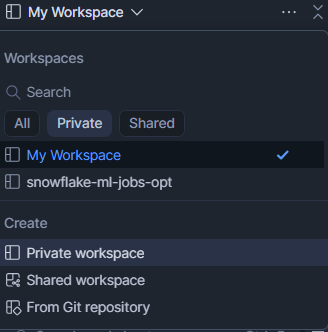
In this example, we will demo a simple portfolio optimization example from our previous blog in a Private Workspace.
2. Sync Your Model Files
We begin by uploading three local files into the Workspace:
- opt_model.py which contains the optimization model class,
- parameters.py which stores model parameters, as well as Snowflake Table locations for inputs and outputs,
- requirements.txt which specifies the Python dependencies
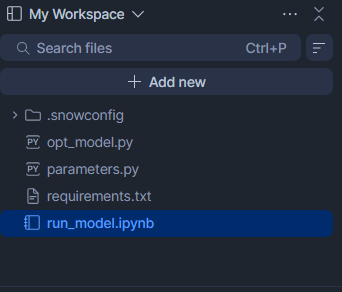
Simply uploading the files is sufficient – no overhead to package the model or build a container environment. If the Workspace is connected to a Git repository, all files can be versioned and shared through Git workflows.
After uploading the local model files, we create a Notebook as an entry point for our optimization model, responsible for reading data, executing the optimization model, and writing results.
3. Configure Runtime
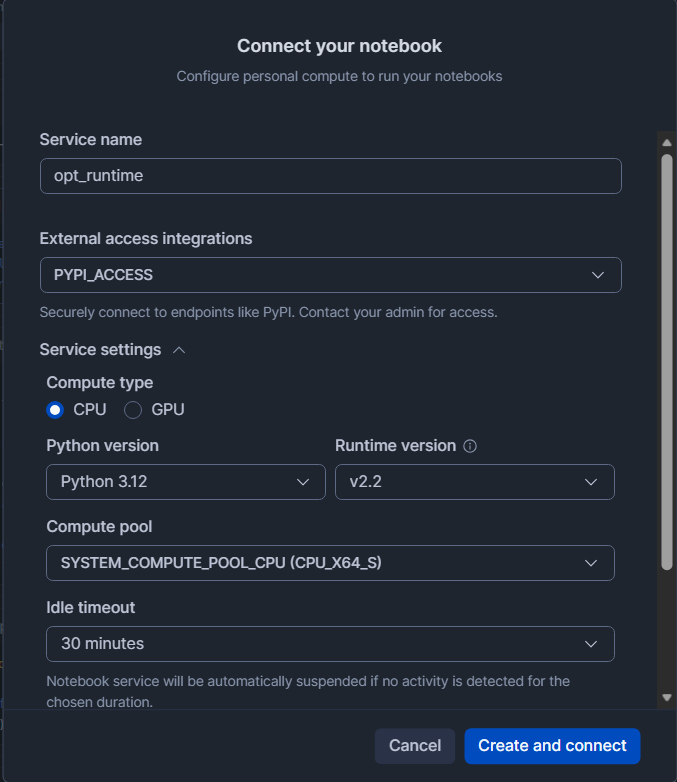
After creating the Workspace and uploading the corresponding files, the next step is to connect the Notebook to a runtime environment. In the runtime configuration, we can specify the Python version and select an appropriate compute pool to support this workload. External access integrations (EAI) must be configured to enable PyPI access or any other required outbound connections.
This setup step reduces the effort needed for the environment configuration that would otherwise be required in local development or container-based workflows.
4. Build the Orchestration Notebook
With the runtime configured, we populate the Notebook to run the optimization workflow:
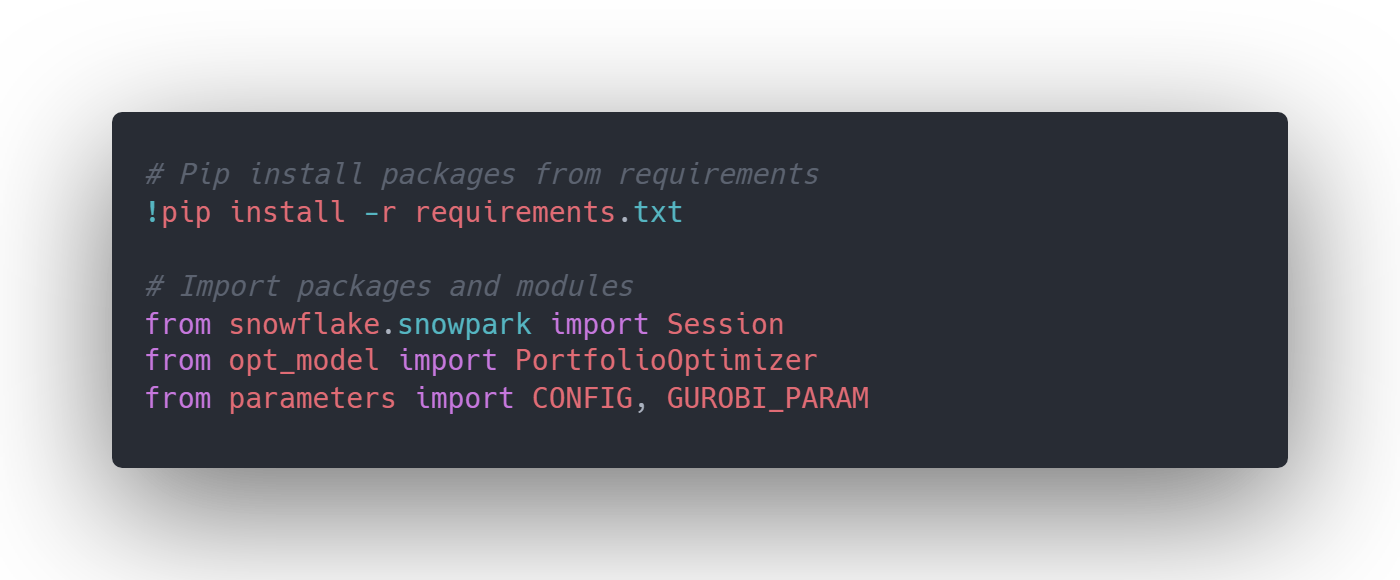
Setting up Python packages
Since PyPI access is enabled, required packages can be installed directly within the Workspace environment. An alternative approach is to run the pip command directly in the compute pool terminal in Snowsight.
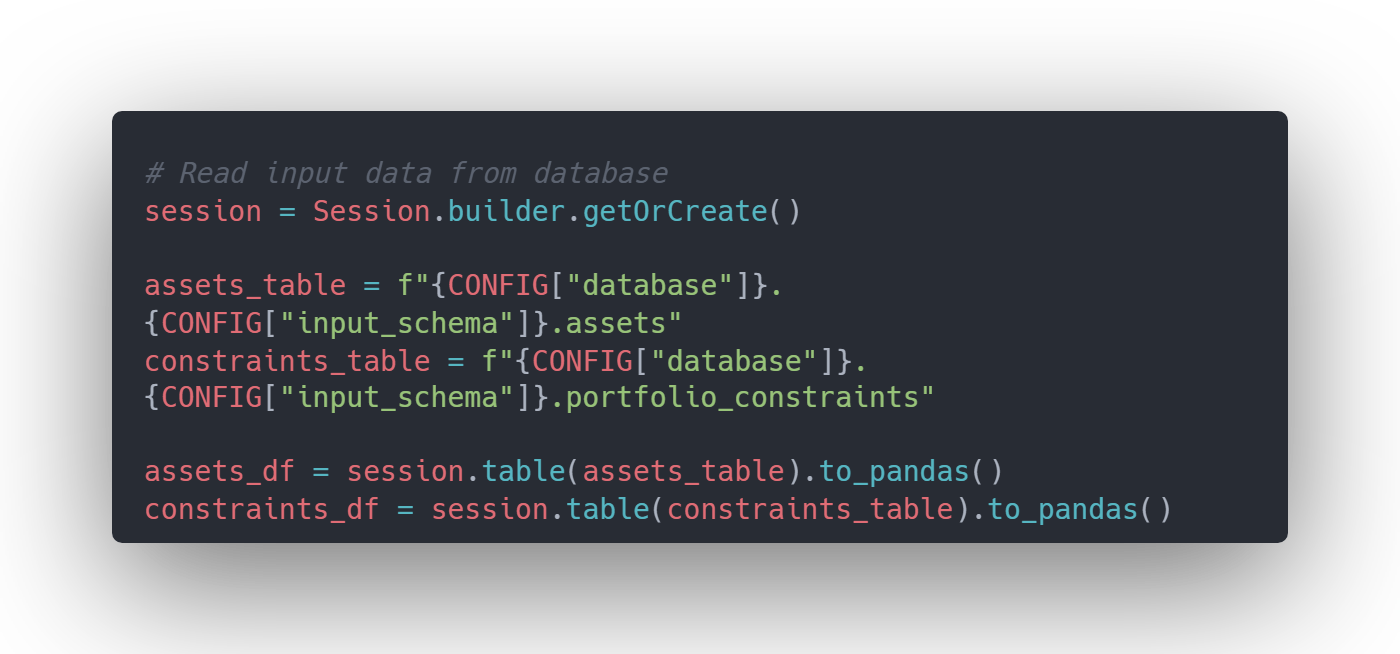
Loading input tables
The optimization model retrieves asset returns and constraint data directly from Snowflake tables. No external connectors or credential management are required.
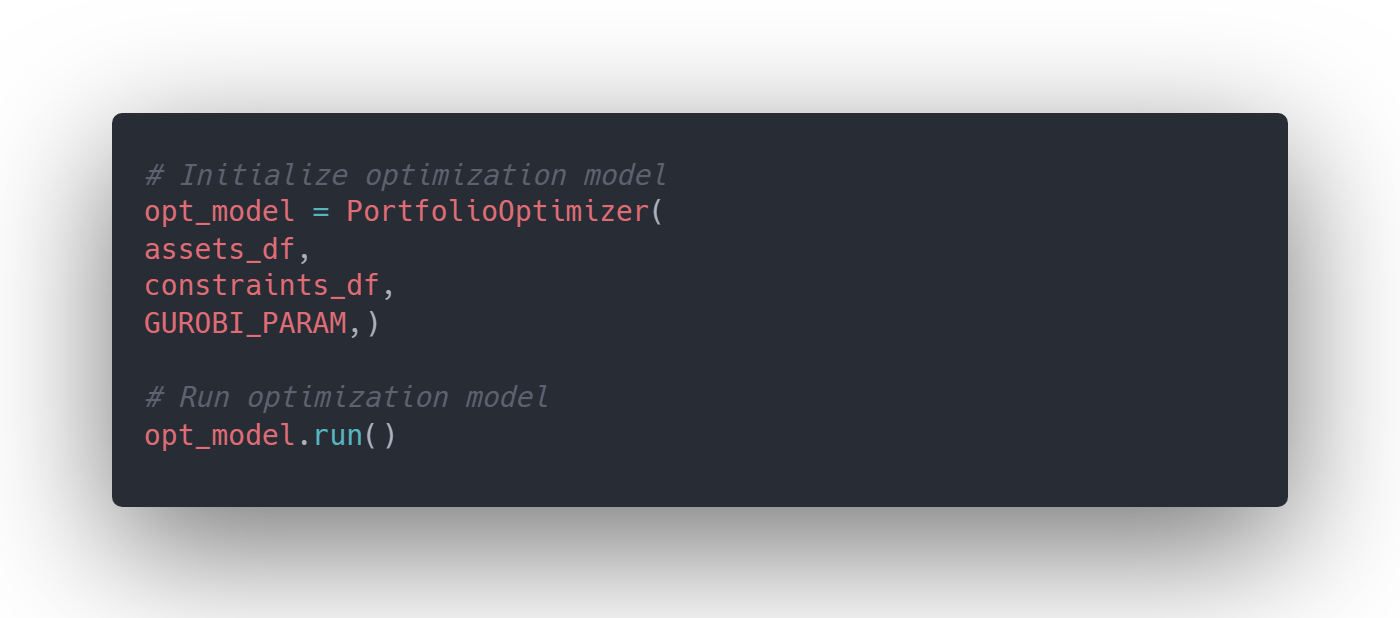
Executing the optimization model
The Notebook initializes the model, passes in the required data, and solves the optimization problem using the imported Python module.
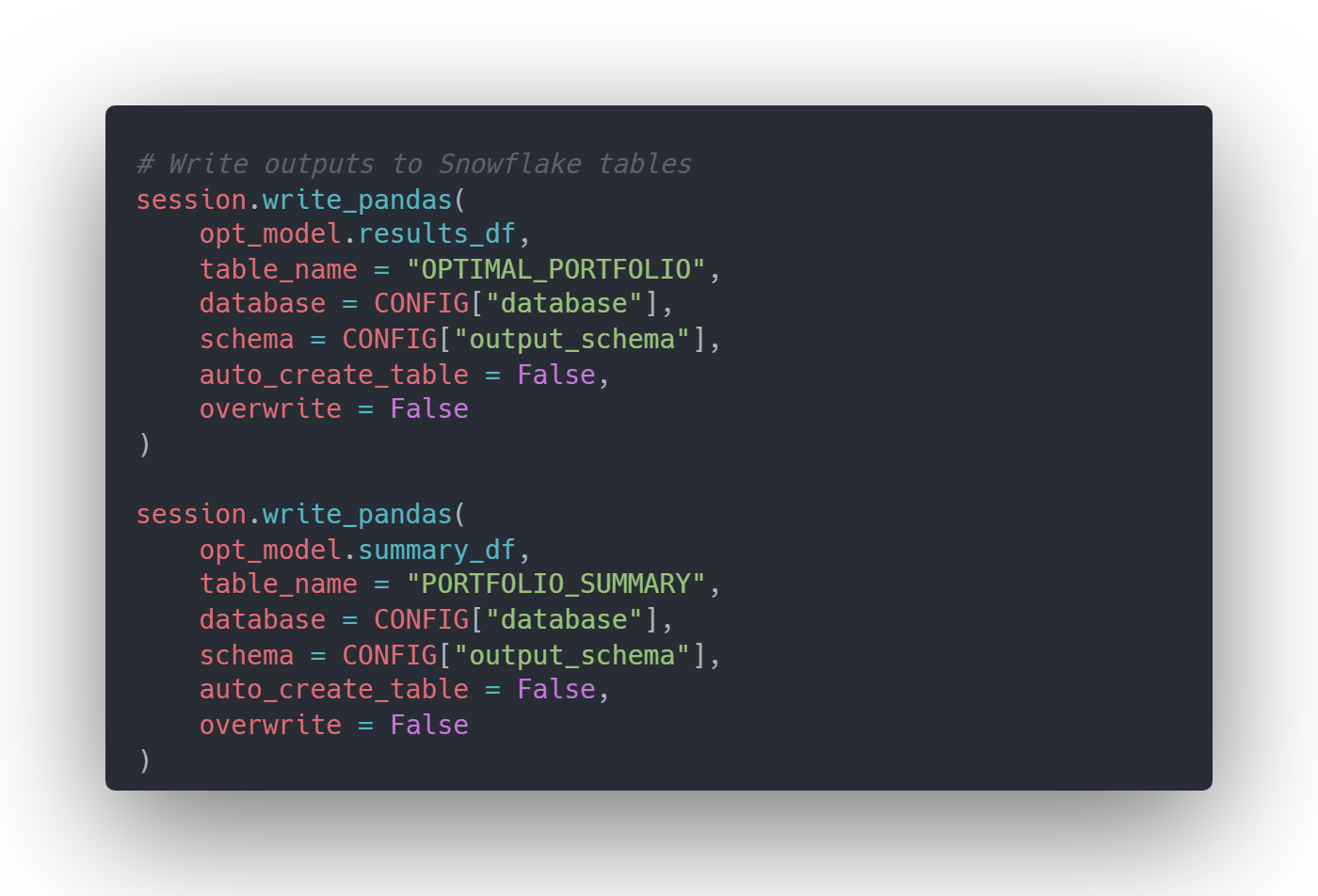
Writing results back to Snowflake
The optimal portfolio allocation is written directly to a Snowflake table, making it immediately available for downstream reporting or analysis.
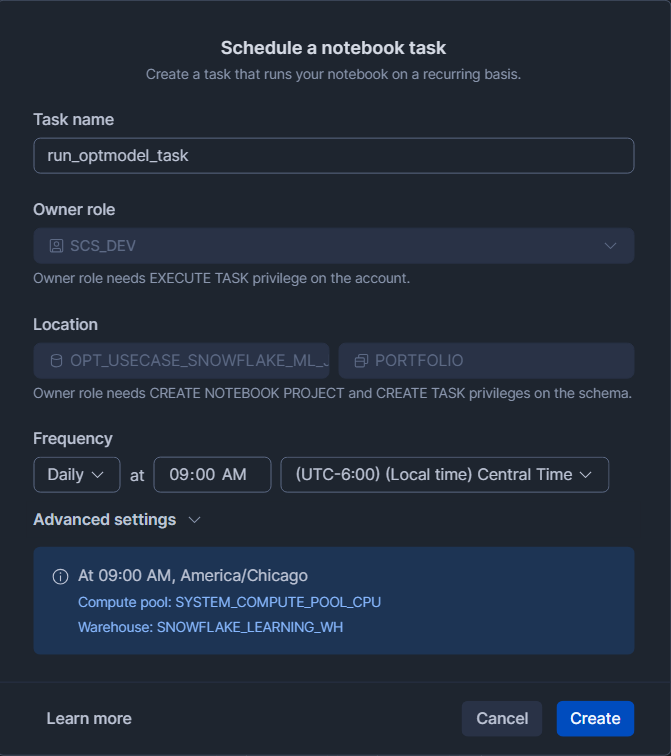
5. Schedule for Production
After completing the Workspace project, the optimization model can be deployed using Snowflake Tasks to schedule automatic runs for regularly refreshed data.
6. Non-Interactive Execution and Git-Based CI/CD
Workspaces also support non-interactive execution through EXECUTE NOTEBOOK PROJECT, where the MAIN_FILE parameter must point to the Notebook file within the workspace. When combined with a Git-backed Workspace, this unlocks a clean and maintainable CI/CD pattern. Model updates can be promoted simply by merging changes into the tracked branch, without modifying the task definition itself. This separation keeps deployment logic stable while allowing code to evolve through standard Git workflows, enabling controlled, versioned promotion across environments.
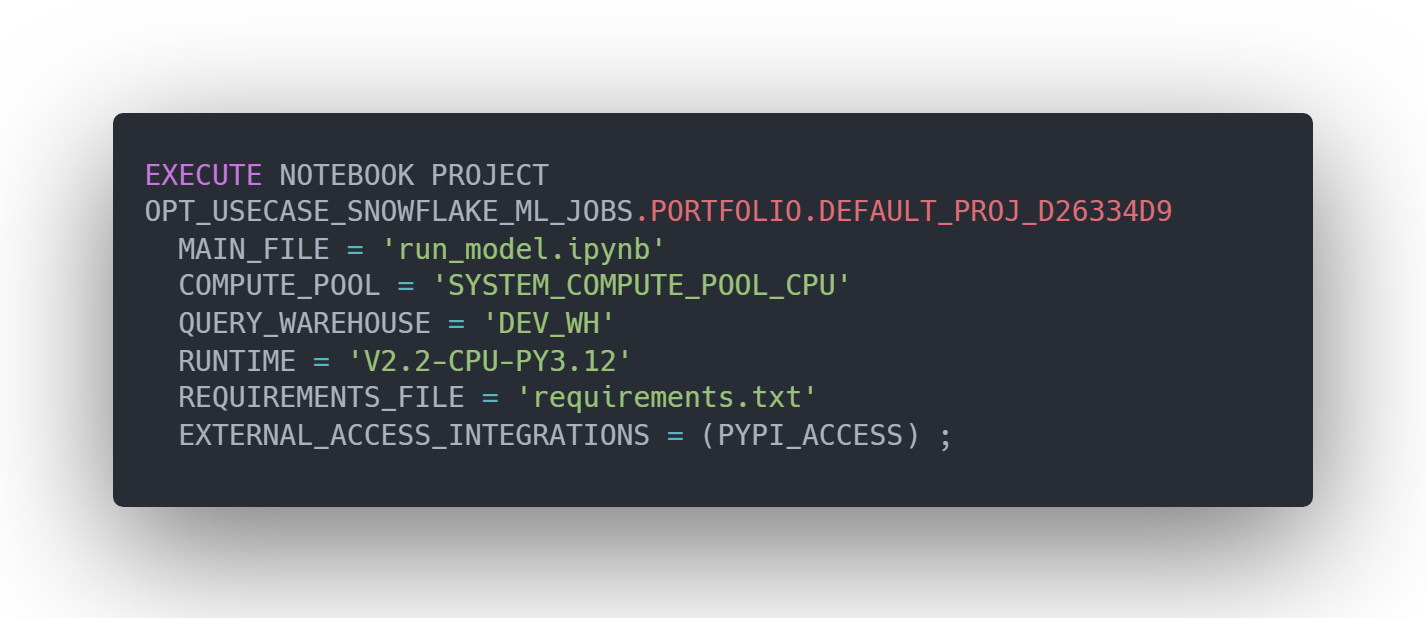
Executing Notebook projects requires both USAGE and MONITOR privileges on the warehouse. Additionally, the RUNTIME parameter must follow the standard format: V<runtime version>-CPU/GPU-PY<Python Version> (e.g., V2.2-CPU-PY3.12). This explicitly defines the runtime version, compute type (CPU or GPU), and Python version used during execution.
This example demonstrates how Snowflake Workspace provides a streamlined, integrated environment for developing optimization models. Data access, model development, execution, and result persistence all occur within Snowflake, eliminating the need for external environments, connectors, or packaging steps during development.
Want to try this yourself? Download the complete portfolio optimization codebase template, including the Portfolio Optimizer class and Snowflake Notebook to adapt for your own optimization use cases.
Key Advantages for Optimization Teams
Similar to ML practitioners, optimization teams also need to manage dependencies, structure model code, integrate data, and transition from experimentation to production, often using separate tools. Snowflake Workspace addresses these challenges by bringing them into a unified environment:
Simplified Dependency Management
Optimization models often rely on specialized Python libraries such as Pyomo, Gurobi, AMPL, or CPLEX. Workspace natively supports Python libraries via PyPI access. When creating the runtime attached to the workspace, users have the option to configure the EAI to allow PyPI access. This native support makes it easy to manage optimization specific dependencies, and removes the need to build and maintain Docker images or other packaging mechanisms during development.
Seamless Data Integration
Running natively within Snowflake enables direct reads and writes to tables, views, and stages using simple SQL. No connection setup, credential management, or external connectors required, dramatically reduces data plumbing overhead.
Production-Ready Automation
Workspace supports automation via built-in scheduling feature, which creates a Snowflake Task running the project on a recurring basis. This automation can be set up in Snowsight without additional effort to manually create a task and DAG (Directed Acyclic Graph) for scheduling optimization runs.
Git Integration for Version Control and Collaboration
One main pain point for optimization development is maintaining consistent model versions across environments. Workspace addresses this with native Git integration, enabling standard version control workflows directly within Snowsight.
Together, these capabilities make Snowflake Workspace a natural development environment for optimization practitioners, allowing practitioners to focus more on modeling decisions and less on infrastructure.
Ready to Deploy Optimization Projects in Snowflake Workspace?
Reach out to Aimpoint Digital to discuss optimization project development and deployment within Snowflake Workspace. We offer expertise in design, build, and deploy optimization solutions on Snowflake. Whether you are prototyping a new model or productionizing a large-scale optimization workflow, we can help you make the most of Snowflake Workspace.