AI functionality is spreading at an incredible rate across platforms and technologies in virtually all industries. The excitement is real, and the rapid pace at which we can now bring new functionality to market is drastically greater than most people could have thought possible just 2 years ago. There are, of course, huge benefits to this, with new technology landing daily and humans able to achieve far more than they previously could, as AI removes a lot of the technological boundaries and learning. For example, somebody with zero coding experience is now fully enabled to get their own website up and running through a number of different potential backend technologies, all by simply interacting with an AI agent and explaining what they want. However, as I'm sure many readers will have seen, there is a large gap between what AI can achieve and what today’s experts would consider to be best practice. Continuing with our example, somebody who is not familiar with the technology behind their website may easily make mistakes or go down inappropriate rabbit holes, as they simply do not understand the processes to the required depth. This is a factor in why we have seen several recent stories regarding security issues, API keys being published, data being stored incorrectly, etc.
It is important to note that this issue is not only faced by people new to whichever technology they are getting AI to assist with (e.g. Claude Code, Cursor, etc.). This issue is prevalent across all industries and it's noticeable from all levels of expertise as people begin to trust AI more and are being far less detailed in their code reviews. This creates a risk of things slipping through the cracks with potentially unknown consequences. Or at least these consequences are unknown until somebody finds them a few days/weeks/months later, and often this discovery is an alarming one.
With so many different pieces of functionality being released at such a rapid pace and humanity’s natural curiosity driving the desire to immediately try it out, it is very easy for people to leverage new functionality without fully understanding the risks involved. Even if they do understand the risks, it is still easy to make mistakes. Neither humans nor automated systems are immune to mistakes, even if our mistakes may differ in their nature.
The risk of unexpected costs
One very important risk (which this article addresses) is that of cost; specifically, when leveraging AI functionality in Snowflake. In addition to relatively new customers of the platform who may easily misunderstand cost, there are many users who have been leveraging the Snowflake platform for years and who may think that they already understand how to mitigate their costs in Snowflake effectively. Of course, the tried-and-true method that we have all relied on for years would be to leverage resource monitors. Typically, an account-level resource monitor would be your ultimate fallback to prevent your Snowflake costs exceeding a certain amount, as you can directly target an overall credit consumption limit for your account for each reporting cycle.
However, we exist in a new world of AI where everybody is eager to leverage fantastic new functionality, and it is easy to overlook core differences between AI and standard consumptions costs. For example, whenever you run any regular SQL AI function in Snowflake, such as the AI_COMPLETE function, your costs are broken down into multiple streams. You still have the regular credit consumption cost of whichever warehouse is running your query, but you also have a separate cost based on your AI tokens.
Here is an example breaking down some of Snowflake’s service types for costs, where we can see regular warehouse-based credit consumption denoted by the “WAREHOUSE_METERING” service type.
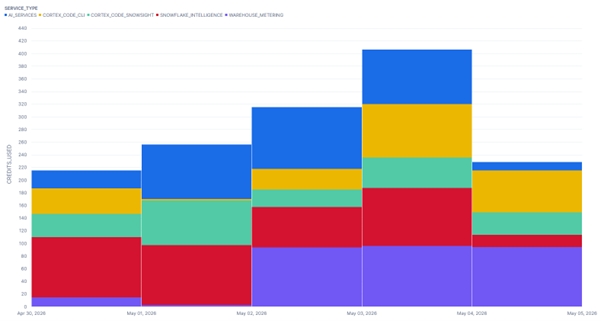
This AI token cost is still reflected in all of your various cost monitoring areas within the Snowflake user interface; however, these costs are NOT monitored by resource monitors as they are not credit consumption costs.
Snowflake’s documentation states that “Resource monitors work for warehouses only. You can’t use a resource monitor to track spending associated with serverless features and AI services. To monitor credit consumption by these features, use a budget instead.”
AI functionality costs are not explicitly covered by resource monitors
Therefore, relying solely on resource monitors and similar credit-based cost monitoring tools exposes you to the very real risk of unanticipated cost increases when leveraging AI. The value proposition of AI is obvious but, left to our own devices, can come at a serious monetary cost; especially when something goes wrong. You may think you have everything created exactly how you wish, only to learn later that the chatbot you deployed is far more popular than you expected, or that the volume of documents that you need to process has increased tenfold as excitement for your new product has increased, or any other reason why the general scale of something may make an unexpected jump. The biggest jump of all, of course, is when an unexpected error has occurred and led to an inefficient process spending far more tokens than it should.
The volatile nature of AI functions
You may not realize that Snowflake's AI functions, such as AI_COMPLETE, AI_CLASSIFY, AI_TRANSLATE, AI_PARSE_DOCUMENT, etc., are actually volatile external functions. For those unfamiliar, this means two very important things:
- By definition, a volatile function is a function that may return different outputs when provided with the same inputs. Here, “volatile” is the technical term for such a function and can be seen across many database technologies such as PostgreSQL, Oracle, MySQL, and more.
As we have all seen through our individual journeys conversing with LLMs, there is an element of variety that comes in LLM responses. Providing the same prompt twice will not necessarily give you the same output twice.
- An external function in Snowflake is a function that actually performs the majority of its processing outside your Snowflake warehouse. Of course, in the AI functions use case, the processing of your data still sits within the secure Snowflake environment and aligns with all the expected security protocols. Depending on your cross-region inference configuration, the LLM processing your prompt may even sit in another region. Again, still securely within your safe bounds of the Snowflake ecosystem.
Even if you understand both points, the real risk here is not readily apparent. The risk only becomes apparent when appropriate cost-management and query optimization tools are not utilized and understood correctly. The following representative example demonstrates such a scenario.
A representative example of a simple mistake, exacerbated by scale
The following example is just one potential way that we can see the volatile nature of an AI function in practice, and I think it is a great example to demonstrate how a process can get out of hand without proper monitoring.
For this example, we are using the AI_PARSE_DOCUMENT function to retrieve information from a set of 50,000 documents. The names of all 50,000 documents are stored in a table called "MY_DOCUMENT_LIST", and our plan is to execute the AI_PARSE_DOCUMENT function on these documents in small batches of 25 files at a time. Using asynchronous jobs, we can then execute multiple batches simultaneously and therefore process our full set of documents much faster than if we tried to process them all within a single query.
We start with a query that retrieves a single document to process within a CTE and puts it through the AI_PARSE_DOCUMENT function:
create temporary table "BATCH_123"
with cte__documents_to_process as (
select ...
from "MY_DOCUMENT_LIST"
where "FILE_REF" = '<single file reference>'
)
, cte__parsed_document_data as (
select
        ...
      ,  < AI_PARSE_DOCUMENT invocation >
as "PARSED_JSON"
from cte__documents_to_process
)
select ...
from cte__parsed_document_data
;
On the surface, this query looks okay; however, we have already taken a risk here. Within this single query, we are both finding the list of files that we wish to process and sending that list of files through the AI_PARSE_DOCUMENT function. We are relying on Snowflake's query optimizer to know the order in which we want each step to be processed. The desired approach here may be obvious as a human reader because we humans are used to reading things from top to bottom and naturally assume that that is the order in which things will happen. Therefore, we assume that this process will first perform the filter on our table of documents to find just 25 values and then execute our AI function for those 25 values.
As we have not taken explicit precautions to ensure our desired order of operations, we are relying on the query optimizer within Snowflake to perform these steps in the desired order. We expect the query to only send 25 documents to the AI function, not the whole set.
Snowflake's query optimizer always does its best to drive the most performant execution of any query that it is given. As the query involves a volatile external function (the AI function), the query optimizer does not have all of the information on how the processing will take place, as much of the processing is taking place outside of the Snowflake warehouse. As it does not have all of the information, it does its best with what it has but cannot guarantee the most optimal plan.
Snowflake's query optimizer cannot guarantee the most performant execution plan when a volatile external function is involved.
Remember that resource monitors do not keep an eye on the costs of this function, so previous cost-monitoring solutions may not protect us if something goes wrong here.
Example of how a minor change can affect the query optimization when leveraging volatile external functions
To know how the query will be executed, we can either leverage Snowflake’s EXPLAIN functionality, or we can execute the query and view the query plan. Naturally, the former is a safer route to take than the latter, but the latter is easier to read so I will use that for this article’s demonstration.
Here is the query plan for our query, where we have filtered for a single test file within our CTE:
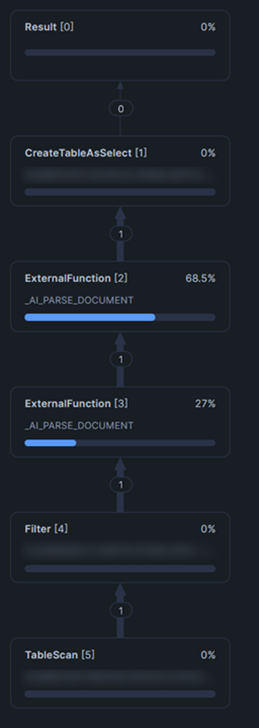
Here we can see that the process performed exactly as we hoped: first filtering to a single document and then processing that single document with the AI_PARSE_DOCUMENT function.
So why am I showing this? What can go wrong?
Let's try the same query again, but with a very minor change:
create temporary table "BATCH_123"
with cte__documents_to_process as (
select ...
from "MY_DOCUMENT_LIST"
where "FILE_REF" = '<single file reference>'
)
, cte__parsed_document_data as (
select
...
, < AI_PARSE_DOCUMENT invocation > as "PARSED_JSON"
from cte__documents_to_process
)
select ...
from cte__parsed_document_data
where "PARSED_JSON" is not NULL -- new filter to avoid inserting empty outputs
;
The change we have made is an additional filter right at the very end of the query. This new filter looks benign and is purely there to improve the efficiency of the process. Or at least it was put there with the intention of improving the efficiency of the process. The problem is that we are dealing with a volatile external function where Snowflake's query optimizer can only do what it thinks is best for optimization, but it does not have all the information it needs to do so as some of the processing happens externally to the SQL engine.
In this case, the optimizer decides that a good way to improve the performance of this query is to apply all filters at a later stage of the query plan. In other words, it decides to first execute the AI_PARSE_DOCUMENT function for all records and then apply filters for both the document list and the parsed JSON output.
Here is the query plan for this new query:
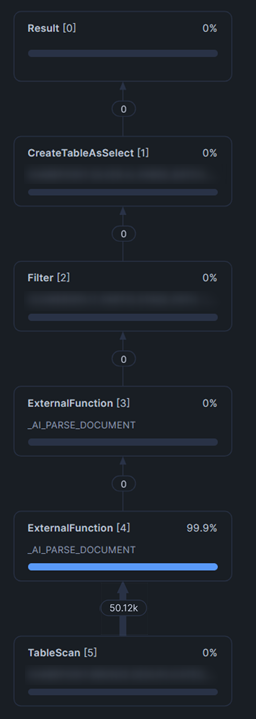
It is easy for a human (LLM / coding assistant augmented or otherwise) to miss the crucial error that has taken place here. If the first query ran successfully and we even went as far as checking the query plan and confirming that we were happy with the result, then it is easy to assume that a minor change to that query will not have a significant impact on the processing. Instead, we can see from this query plan that all 50,000 documents were put through the AI_PARSE_DOCUMENT external function. This is far more significant than processing just a single document. And to the point, this is far more costly.
How scale can exacerbate an issue
Now imagine if this error was not identified. Let's say you tested everything with the first query that filtered on a single file and was very happy with the result. Maybe you even tested it again on a set of 25 files and were still happy with the result. You then decided that it was time to trigger the large asynchronous batching process that would execute all 50,000 files in batches of 25. While creating the batching process, you happened to make the minor modification leading to our second query as an off-the-cuff performance improvement.
With easy math, we can see that processing 50,000 files in batches of 25 would lead to 2,000 individual queries. If this process was triggered to run overnight, then it has the potential to run 2,000 queries that all have this query optimization error.
This would result in all 50,000 documents being sent to the AI_PARSE_DOCUMENT function 2,000 times, totaling 100,000,000 documents being processed by the AI_PARSE_DOCUMENT function. As you can imagine, the token costs here would be significant.
The irony here is that the mitigation for this, which may be considered overly cautious, is remarkably straightforward. Simply write your input records into a temporary table instead of using a CTE, as this forces Snowflake to only consider your small batch of records.
The representative example outlined above is just one potential way in which AI costs can get out of hand. This risk is present in any platform, and it is important to deploy whatever safeguards your platform has available. As stated above, resource monitors in Snowflake only monitor credit consumption, and this is not a credit consumption issue. A resource monitor would completely ignore this event and would not stop this snowball as it continues rolling down the proverbial hill.
Realistically, this example of a cost explosion would have been vastly mitigated through a stronger code review and a more cautious approach, as the large-scale parallel execution dramatically inflated the issue. However, it serves as a great example as to why it is also important to apply technical guardrails where possible.
In Snowflake's case, the solution here comes in the form of custom budgets. You can read about how to implement these in our companion article: Proactively monitoring AI costs in Snowflake using Custom Budgets.

.png)