.png)
Introduction
Databricks Genie Spaces lets business users query structured data in plain English - point it at Delta tables, ask a question, get SQL-powered answers instantly. But real enterprise questions rarely live in one domain.
A sales executive asking, 'Why are Q1 revenues down in the Northeast and are there relevant customer sentiment signals from the field?' needs answers from structured transactional data, unstructured support tickets, and promotional data simultaneously. No single Genie Space can handle that.
This isn't a hypothetical edge case - it's one of the most common and most valuable questions in any enterprise data environment. Today, answering it requires an analyst to manually pull reports from multiple systems and stitch together a narrative, typically taking hours. Multi-agent Genie delivers the same answer in seconds.
Multi-agent Genie architectures are designed to solve this problem. This blog walks through what they are, why they work, and how to build one end-to-end on Databricks.
What Is a Databricks Genie Space?
A Genie Space is a Text-to-SQL interface that translates plain English into SQL queries against your structured data in Unity Catalog. The Genie Space is the configuration layer where data stewards curate tables, define column descriptions, add synonyms, inject SQL examples, and set benchmark questions to evaluate accuracy.
Business users can ask 'What were total sales in the Southeast last February?' and get a precise, SQL-backed answer instantly - no code, no BI tool. For data teams, it means fewer ad hoc requests and more time on high-value work.
Genie excels at 'what happened' questions - revenue by region, inventory by SKU, churn by cohort. When questions become more complex, involving unstructured data, cross-domain reasoning, or multi-step analysis, a single Genie Space hits its limits. That's where multi-agent Genie comes in.
Why Multi-Agent? The Case for Specialization
The core insight is that specialization beats generalization. A Genie Space tuned for sales pipeline data with carefully crafted column descriptions, join logic, and SQL examples will dramatically outperform a generic space pointed at an entire data warehouse.
Think of it like your organization's team structure: you wouldn't ask your CFO to answer a support question, and you wouldn't expect a support representative to explain a P&L statement. Each expert knows their domain deeply. Multi-agent Genie applies the same principle to AI - each specialized agent owns its data, and a supervisor routes questions to the right expert automatically.
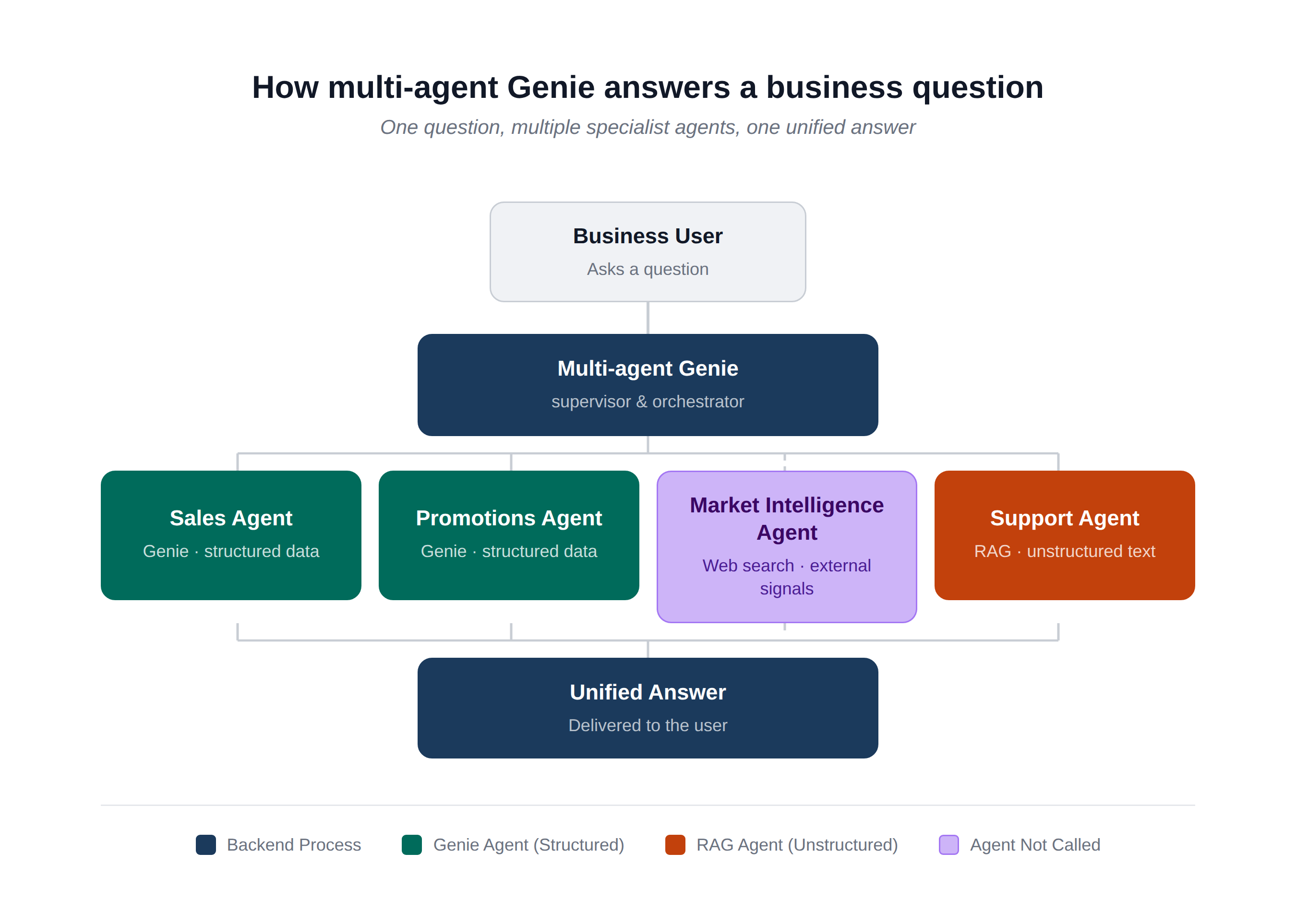
The architecture works like this:
- Supervisor Agent: Receives the user question and determines which specialized agents or tools to invoke
- Specialized Genie Spaces: Handle structured data queries in their respective domains (sales, finance, operations, etc.)
- Other Tools or Agents: Execute other relevant actions to answer the user's query. In this example, a RAG retrieves unstructured data via Vector Search, but this slot could just as easily be a standard API call, a web search, a database lookup, a custom agent endpoint, or any other tool
- Synthesis: the Supervisor combines individual agent outputs into a single, coherent final response
The business impact is direct: a single natural language question now triggers a coordinated, multi-source investigation automatically compressing hours of manual analysis into one conversation turn.
How-To: Building a Retail Multi-Agent System
To make this concrete, we'll build a multi-agent system for a retail organization whose business users need answers spanning three domains: structured sales data, structured promotions data, and unstructured customer support tickets. We'll also include a Market Intelligence agent - a web search tool that pulls in external signals like competitor pricing or industry trends to illustrate that the Supervisor only calls the agents a question actually needs. For our retail scenario, it won't be called at all.
The scenario: a VP of Retail wants to know why home goods sales spiked in February then dropped sharply in March. The full answer requires correlating a promotional campaign, transaction data, and customer support complaints; exactly the kind of cross-domain question that goes beyond a single Genie Space.
Step 1: Create Sample Data
We create three Delta tables that tell the connected retail story: a February promotion in the Southeast drives strong home goods sales, which drops sharply in March when customer support tickets reveal why.
In practice, these tables already exist across your data platform. Genie works with your existing Delta tables in Unity Catalog - no restructuring required. The key is keeping each domain's data (sales, promotions, support) in purpose-built tables rather than a single monolithic dataset.
Step 2: Configure Genie Spaces
In Databricks, navigate to SQL → Genie Spaces and create two Spaces. Configuration quality here directly determines system performance - this is where the team's domain knowledge gets translated into the model's understanding of the data.
Data stewards who understand the business - what 'promo_flag' actually means, what a healthy return rate looks like are the right people to configure these spaces. That investment translates directly into higher-quality, trustworthy answers for business users.
Quick Note: Metric Views are Databricks' semantic layer for AI and BI workloads. Rather than letting Genie reverse-engineer business logic from raw column names, Metric Views let you define it explicitly: which tables join to which, what "gross margin" means, what units a column is in, and what synonyms business users might use. When you point a Genie Space at a Metric View instead of raw Delta tables, you're giving it a pre-interpreted, governed version of your data which translates directly to more accurate and deterministic answers.
For each Genie Space, follow the configuration pattern:
- Point Genie at your Metric View/s as the primary data source. Metric Views provide Genie with a centralized location to govern business definitions, table relationships, column descriptions, and synonyms.
- Add plain-language descriptions to key columns so Genie understands business terms relevant to that domain
- Add SQL Expressions that map common business questions to the correct SQL patterns
- Add benchmark questions with known correct answers to evaluate and improve accuracy over time
For this demo we configure two spaces:
- Sales Genie Space — covers sales transactions and product catalog data, with column descriptions for business terms like revenue, promotional flags, and return reasons
- Promotions Genie Space — covers campaign and discount data, with column descriptions that help Genie reason about timing, discount levels, and regional targeting.

Step 3: Build the Vector Search Index
Support tickets are unstructured - they need semantic search, not SQL. We use Databricks Mosaic AI Vector Search to embed and index the ticket text.
This unlocks a data source that traditional BI tools can't touch. Vector Search finds semantically relevant content - complaints about product quality after a sale -' even when exact words don't match. Support tickets, call transcripts, field notes, and email threads all become queryable, surfacing insights that have historically been invisible to analytics.
%20and%20to%20query%20the%20vector%20search%20index.png)
Step 4: Build the Multi-Agent Supervisor
The Supervisor is the orchestration brain. It receives the user's question, decides which agents to call, collects their responses, and synthesizes a unified answer. Importantly, the supervisor does not call every agent for every query - a narrow question about promotions might only need the promotions agent, skipping sales and feedback entirely. We implement this using LangGraph, a framework built for stateful, multi-step agent workflows on top of Databricks' Mosaic AI Agent Framework.
From the user's perspective, the Supervisor is invisible. They ask a question in plain English and receive a comprehensive, cross-domain answer. Behind the scenes, the Supervisor is doing the work of a skilled analyst: routing, retrieving, reasoning, and synthesizing - automatically, auditably, and at scale.
Step 5: Putting It All Together
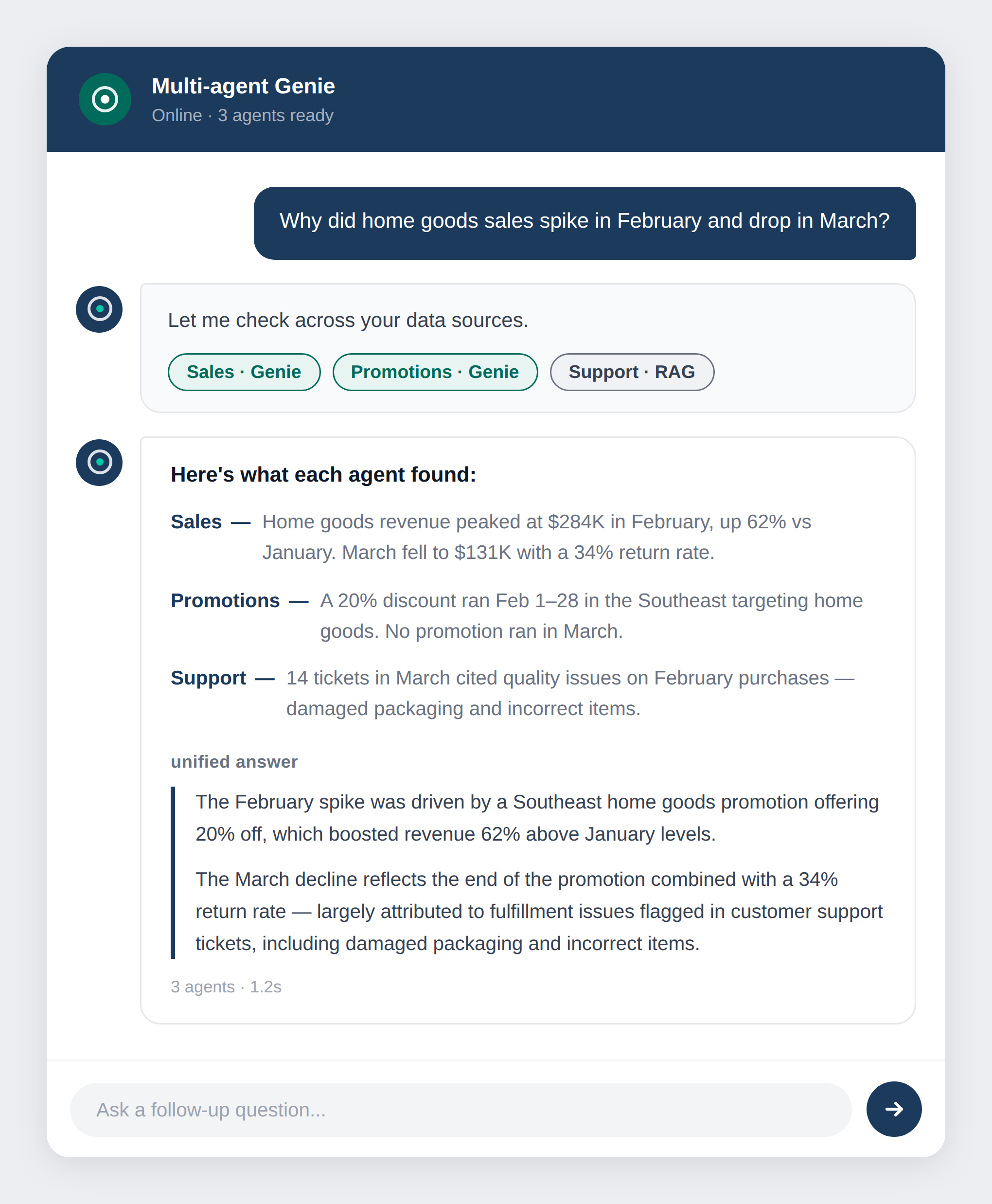
With all agents wired up, we ask the question that would previously have required a team of analysts: 'Why did home goods sales spike in February and drop in March?'
The Supervisor automatically routes to the Sales agent, Promotions agent, and Vector Search function in parallel, then synthesizes the results into a single response, identifying the February promotion as the spike driver, and customer quality complaints as the cause of the March decline.
Key Advantages of Multi-Agent Genie
This architecture delivers both technical and business value across five dimensions:
- Specialization beats generalization: Each Genie Space is tuned for its domain, delivering higher accuracy than any catch-all alternative. In practice: fewer wrong answers, fewer 'I don't know' responses, and higher adoption from business users who need to trust the system.
- Modular and scalable: Business divisions own and maintain their own Genie Spaces independently. Adding a new domain - supply chain, HR analytics, finance - is as simple as creating a new Space and registering a new agent. No central model retraining, no overhauls to existing spaces. The architecture maps naturally to how enterprises are organized: by function, business unit, and domain.
- Unified governance via Unity Catalog: Every agent - Genie, Vector Search, and function-calling - operates within Unity Catalog's governance boundary. All data access is subject to existing row-level security, column masking, and access control policies. Business stakeholders get answers without governance teams creating new exceptions or workarounds.
- End-to-end traceability: MLflow traces every agent call - what queries ran, what data was accessed, and how the final answer was assembled. For regulated industries and any organization building trust in AI-generated insights, this auditability is essential: every recommendation can be traced back to its source.
- Human-in-the-loop ready: The Supervisor supports approval steps and confidence thresholds. For high-stakes decisions - pricing changes, inventory commitments, customer-facing communications - the system can flag low-confidence responses for human review before they reach end users. This gives leaders the control needed to deploy AI responsibly at scale.
Conclusion
A single Genie Space is the right starting point for democratizing data access. A multi-agent architecture is how you scale that to the full complexity of your enterprise — every domain, every data type, every business unit.
With a multi-agent architecture in place, a single question from any business user can instantly draw on structured data, unstructured content, and complex reasoning across domains delivering in seconds what would otherwise take a team of analysts hours to piece together.
For organizations that have invested in Databricks and Unity Catalog, multi-agent Genie is the architecture that makes that investment accessible to every decision-maker in the business. That's not a technical achievement. It's a competitive advantage.

.png)