Introduction
Your organization has data. Lots of it. Let’s connect an LLM-powered chatbot to that data so it can answer all our pressing business questions. Simple enough, you think. AI is intelligent after all, and given the huge leaps in performance in LLMs over the past few years, surely it should be able to understand what I mean when I ask, “What was the revenue in FY25?”, right?
Well, it depends.
In this blog, we’ll review why this task is harder than it sounds, the concrete steps to take to enhance the performance of talk-to-your-data chatbots, and how the Databricks Data Intelligence platform empowers backend developers and front-end business users to get the most out of their data.
The Problem: AI isn’t Magic and We Forget How Much We Know
Imagine you’re a newly hired data analyst, and you’re tasked with building a new dashboard for the C-suite. To get started, you follow up with the C-suite stakeholders to understand their motivation:
- What part of the business are you trying to understand with this new dashboard?
- What questions are you trying to answer with your data?
Next, you follow up with the data stewards who own the data that will help you and the C-suite team make sense of their questions:
- Which tables are relevant in the data warehouse?
- Which columns in those tables are relevant?
- How does our company define key business metrics with respect to these identified columns?
If we didn’t have these conversations with every executive and every data steward, we’d be setting ourselves up for failure. Here’s my point: If you must tell a human these things, you must also tell AI these things. AI isn’t magic. It doesn’t just know because it’s AI. Fortunately, there are Databricks features built to address the gap between human understanding and raw data: Metric Views. More broadly, metric views are Databricks’ take on an emerging data layer tailored to AI and BI use cases: the semantic layer.
Let’s take a closer look at how Databricks addresses the semantic layer.
Enter Genie Spaces: Talking to Your Data in Business Lingo
Databricks released Genie Spaces in June 2024 to democratize analytics for business users who weren’t comfortable writing SQL. The idea: point Genie at some tables and ask away. Unfortunately, business users found the performance lacking for a reason as old as time: garbage in, garbage out. If the tables that Genie reference have a complex structure, if the data quality is poor, or if the column names aren’t business friendly, Genie will have a hard time generating trustworthy results. This is no surprise: when we ask a human to answer questions using poorly modeled data with bad data quality and unclear naming conventions, they also struggle to produce quality output. Turns out, the quality of the data model that we point our Genie Spaces at is the most important factor in building enterprise-grade talk-to-your-data chatbots.
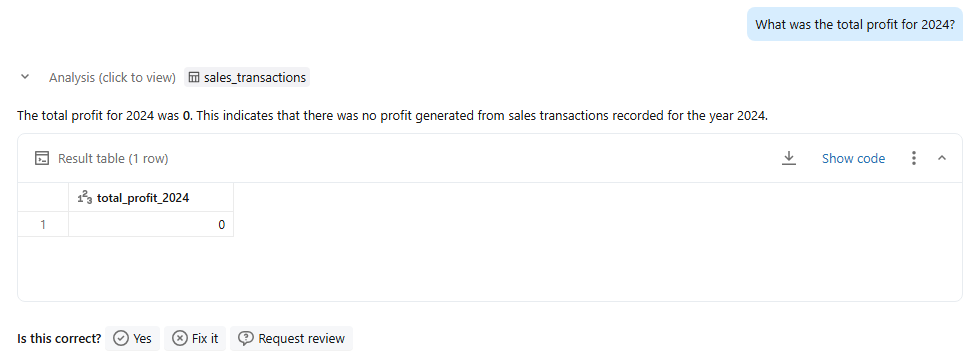
Let’s take an example that we’ll run with over the course of this blog. We’ll work with the Databricks-provided Bakehouse Dataset, and we’ll ask, “What was the total profit for 2024?” Below, figure 1, shows the out-of-the-box Genie-provided response. Fortunately for the business, the provided answer, $0, is incorrect. So, why isn’t Genie giving me the right answer? If we take a closer look at the data model, we see that there is a totalPrice column and a totalCost column, but no column that represents profit.
Now let’s take a look at how a Databricks’ Metric View fixes this issue.
The Heart of the Solution: Unity Catalog Metric Views
Unity Catalog Metric Views bridge the gap between tables in your database and AI/BI applications, including Genie Spaces. They map messy or unclear column names to key business metrics, they provide a place to inject metadata into AI applications, and they disambiguate relationships between tables in a schema. Essentially, Metric Views eliminate the guesswork that Genie has a hard time doing. Remember, underneath the hood and the hype, LLMs are probability-driven algorithms. Fewer ambiguities result in more deterministic performance.
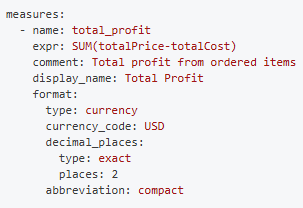
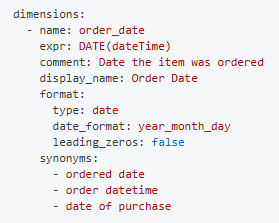
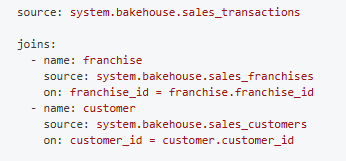
Returning to our example of figuring out the profit for 2024, here's how we would use Metric Views to eliminate ambiguity around the term “total profit”:
- Map unclear column names to KPIs
- Inject metadata like comments and synonyms
- Disambiguate the data model by defining table relationships
Now that we’ve defined this Metric View, let’s see how Genie performs.
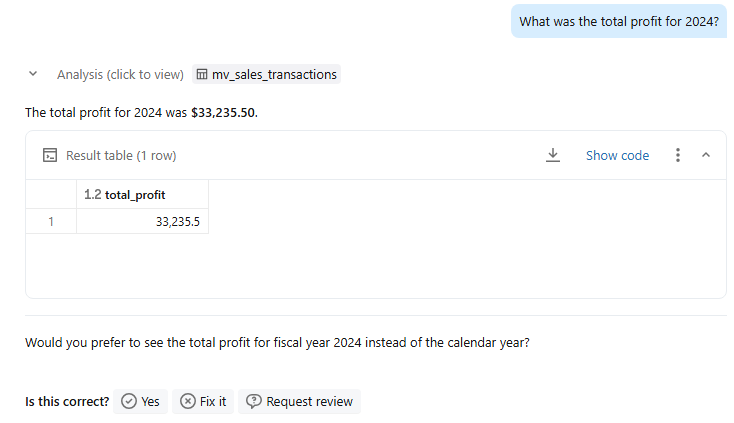
This is the correct answer. With a little extra work, we can feel much better about the results of our talk-to-your-data chatbot. Not to mention, this metric view isn’t only useful for Genie Spaces. It can be used to power dashboards, machine learning models, and alerts. Generally, it serves as a centralized location to define and manage core business metrics.
Taking Semantics to the Next Level: Knowledge Store & Evaluation
Beyond implementing UC Metric Views for better Genie performance, you can further enhance capabilities by taking advantage of a slew of other features available after you’ve configured a Genie Space. Note that some options we have already configured in the Metric View are also available to configure within the Genie Space itself, like joins, synonyms, and descriptions. We’ll explore some of the options unique to the Knowledge Store, and what problem, or set of problems, each feature solves.
- General Instructions
- Problem: Organizations often have a dizzying set of acronyms that need to be explicitly defined for AI use cases. For the thousandth time, please explain EBITDA.
- Solution: Using General Instructions, provide Genie with a list of acronyms that end users ask about. It’s easier to define this once than to tell 100 end- users to change the words they use to describe the business.
- SQL Queries
- Problem: Some end user questions are too vague for a Genie Space to provide a precise, meaningful answer. “Run a month-end analysis of product performance” could mean 1,000 different things to 1,000 different executives.
- Solution: Define a SQL Query to return based on common user prompts. For example, that “month of analysis of product performance” could mean sales, costs, and profit by item name, franchise, and day of week.
- Benchmarks
- Problem: Especially with GenAI applications, it’s hard to know if the app is doing what it’s supposed to do. Evaluating a probabilistic, creative application is difficult precisely because of its probabilistic nature.
- Solution: Add Benchmarking question-answer pairs to evaluate your Genie Space’s accuracy and to identify context gaps. Genie Spaces should be deployed for a specific use case, and these question-answer pairs define the use case and remind the developer that the space is not a silver bullet so much as a curated place to answer specific questions about a limited dataset.
Conclusion: Data That Finally Listens
Building a talk-to-your-data chatbot can unlock precious time for data teams swamped with ad-hoc requests and empower business users to ask flexible questions about their data. Before promising end users a know-it-all, one-stop-shop, near-AGI chatbot, remember that AI-applications are only as good as the data and metadata underneath it. Between Databricks’ UC Metric Views and Genie Space Knowledge Stores, chatbot performance dramatically improves. Now that we have the tools to operationalize the semantic layer, let’s get to work.
Partner with Aimpoint’s Team of AI Experts
Wherever you are in your GenAI journey, from initial idea to proof of concept, our team of experts is ready to partner with you to bring your GenAI applications into production.